1.7. Project Payment
A feature for managing payments and outsourcing-cost transactions at the trade project level and tracking individual details. (This is management of billing details; actual blockchain-based smart contract payment operates in conjunction with the Escrow menu.)
💬 Try it with Lyra
- "Summarize the payment status"
- "Tell me the outstanding payments"
- "Export the payment data to Excel"
Detailed feature guide: Lyra Interactive Features Guide
1. Project Billing & Invoice
Records financial flows such as the Commercial Invoice amount to be issued to the customer on export, and the amount to be paid on import.
- Payment Request: Add billing according to the ratio of stage-by-stage amounts (advance payment, interim payment, balance) within the project details, and specify the items the counterparty must pay.
- Mandatory linkage of supporting materials: For a billing record to move on to the escrow and payment screens, the related supporting documents (PO, Invoice, etc.) must be uploaded in the
Documentstab and attached to that charge.
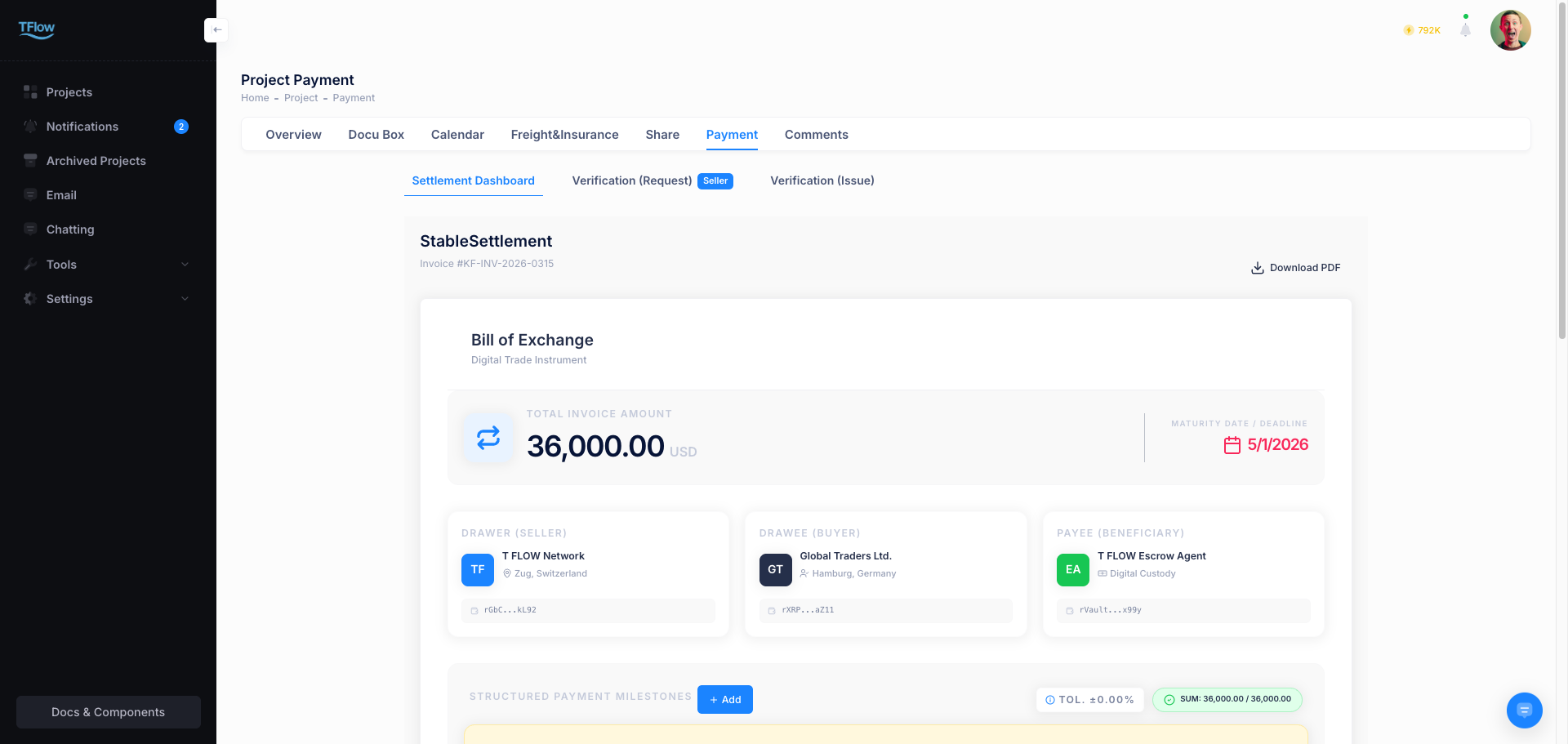
2. Payment Status Types
A payment request goes through internal/external approval workflows and passes through several stages.
- Pending: The initial state in which a payment request has been created but system approval or verification is not yet complete.
- Processing: Escrow is being prepared, or the remittance has started but the deposit has not been confirmed yet.
- Completed: The state in which the remittance and deposit have been finally confirmed.
- Canceled (Rejected): A record that was rejected or expired due to an information error or contract revision.
3. What You Must Fill In Before Raising a Charge
- Recipient details: If the receiving party's bank details (SWIFT code, account number, business name, etc.) are missing, the charge will not be registered.
- Amount: An amount that does not match the project total will also be rejected. Fill in both and try again.
1-1. Payment Troubleshooting and FAQ
- Q: "I can't create a payment request, and it says 'Required supporting information is insufficient.'"
- A: If linked supporting documents such as a Commercial Invoice (CI) or Purchase Order (PO) are missing, you cannot press the payment request button. Please first upload the documents in the
Documentstab and Attach them.
- A: If linked supporting documents such as a Commercial Invoice (CI) or Purchase Order (PO) are missing, you cannot press the payment request button. Please first upload the documents in the
- Q: "The payment record for an Invoice I created has changed to 'Canceled' status."
- A: The charge was rejected because its content did not match the supporting evidence. Check the rejection comment in the detail view, correct the amount, and re-submit.