Trade Wiki
The Trade Wiki (/b/wiki) is a space that gathers reference materials, terms, and codes you can use directly in your trade work. Use the top tabs to move between Archive · Trade Glossary · HS Code and more.
💡 Who is this for? Anyone looking for practical trade materials (forms and guides), anyone who wants to check the meaning of an unfamiliar trade term, and anyone who wants to look up a product's HS Code along with its tariff and FTA agreement rates.
1. Tab Layout (6 tabs)
| Tab | Status | Login | Content |
|---|---|---|---|
| Archive | Available | Not needed for the list/preview / needed for full text and attachments | Practical trade documents + attachments |
| Trade Glossary | Available | Not required ✨ | Trade term dictionary (index · search · detail) |
| HS Code | Available | Not required ✨ | HS Code classification tree · tariff rates · FTA lookup |
| UCP600 | 🚧 Coming soon | — | Uniform Customs and Practice for Documentary Credits (planned) |
| Incoterms2020 | 🚧 Coming soon | — | Incoterms trade terms (planned) |
| ISBP745 | 🚧 Coming soon | — | International Standard Banking Practice (planned) |
ℹ️ Opening a coming-soon tab shows the message "This service is being prepared — see you soon!"
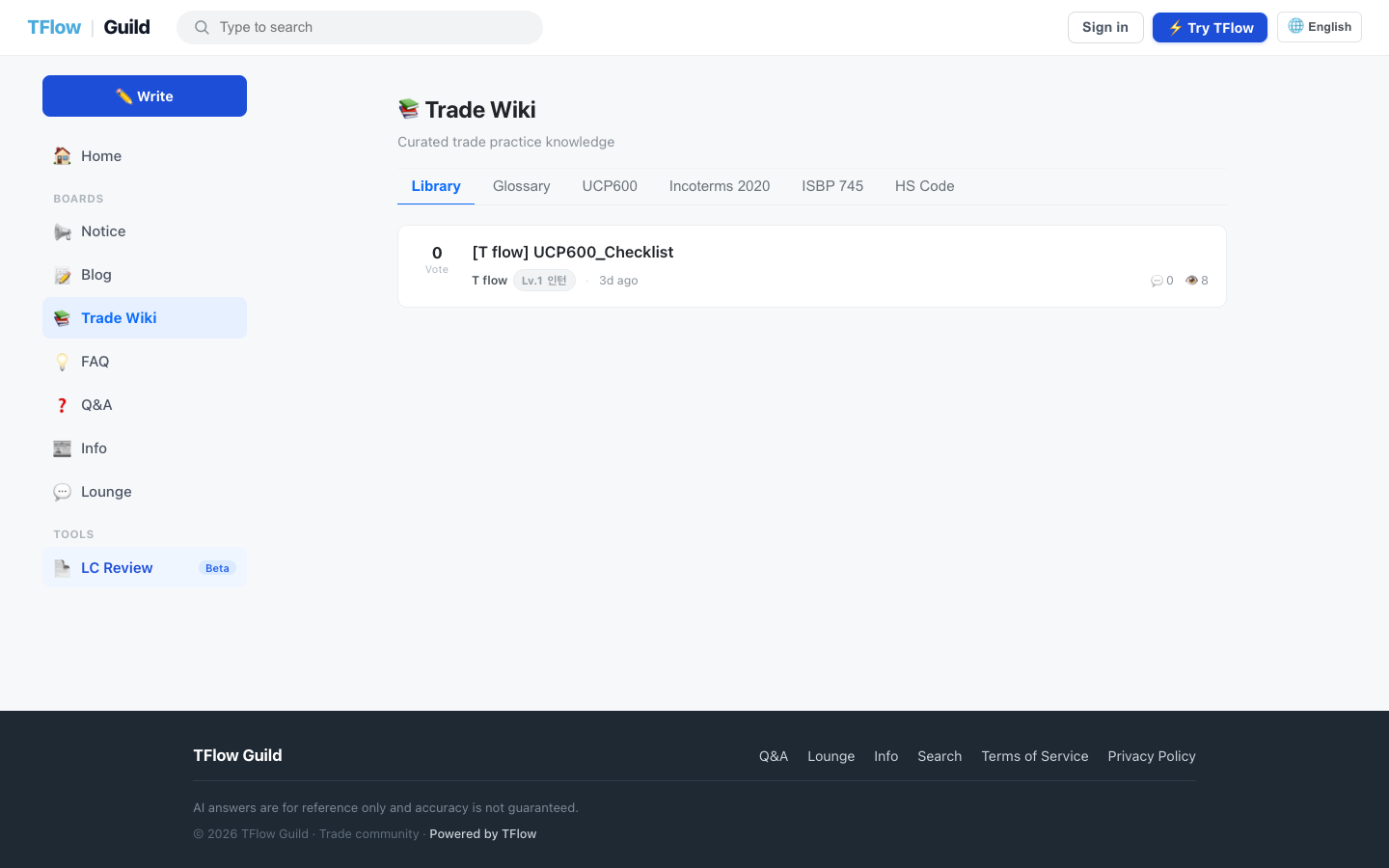
2. Archive
A space that collects practical trade materials. It uses soft gating, so anyone can see the list and previews, but the full text and attachments require login.
Viewing
- Logged-out visitors and search engines: can see the document title and the preview summary.
- Logged-in members: can view and download the full text and attachments.
- If you open a document while logged out, the lower part of the body fades out and a 🔒 "Log in to see the full content." message appears with a Log in and view full content gate.
Attachments
- Supported formats: PDF · DOC · XLS · PPT · HWP · CSV · TXT · ZIP · images (up to 20 per document)
- Downloading is available to any logged-in member.
- Adding, replacing, or deleting attachments is limited to the document's author or an operator. Without permission you'll see "You don't have permission to access this attachment."
- If you attach too many or too large files, you'll see "You've attached too many files" or "Your attachments exceed the total size limit". Remove some or compress them and try again.
- Uploading in quick succession gives "You're uploading too quickly" — wait about a minute and try again.
🖼️ Screen capture Archive document detail — body + attachment list (Download) / fade-out and login gate at the bottom when logged out 📍
guild.tflowx.com/b/wiki(Archive tab) · save locationimages/guild/wiki-archive.png
3. Trade Glossary
A dictionary for looking up trade terms. No login required. ✨ UPDATED (2026-07)
- Layout:
- A search bar at the top (term search)
- Browse by category chips and an index (Korean ㄱ
ㅎ · alphabet AZ) - A two-column layout with the term list on the left and the detailed description on the right
- A term's detail includes the term name and abbreviation, an Official / Under review badge, a summary and detailed description, related term chips, and the source.
- You can share deep links (
?id=…,?q=…) that jump straight to a specific term.
🖼️ Screen capture Trade Glossary — search bar + index (ㄱ
ㅎ / AZ) + two-column term list and detail 📍guild.tflowx.com/b/wiki(Trade Glossary tab) · save locationimages/guild/wiki-glossary.png
4. HS Code
Find a product's HS Code and look up its tariff and FTA agreement rates. No login required. ✨ UPDATED (2026-07)
- Search: enter an HS Code or product name of 2 or more characters to search.
- Classification tree drilldown: expand step by step from section → chapter → heading → subheading → national tariff line (subclassification).
- Details: code · product name · classification hierarchy · base rate and unit · country-specific tariff line · FTA agreement rate table (agreement / rate)
- You can share a deep link (
?code=…) that jumps straight to a specific code.
ℹ️ HS Code in the Trade Wiki is lookup (read) only. It does not include AI auto-classification or similar features. If the lookup tool is temporarily down, the message "The tool service is temporarily unavailable. Please try again shortly." may be shown.
🖼️ Screen capture HS Code — search bar + classification tree (section · chapter · heading · subheading) + detail (base rate · country-specific tariff line · FTA agreement rate table) 📍
guild.tflowx.com/b/wiki(HS Code tab) · save locationimages/guild/wiki-hscode.png
5. Tabs Coming Soon
The following tabs are still having their content prepared. Opening them shows a "This service is being prepared" message.
- UCP600 — Uniform Customs and Practice for Documentary Credits
- Incoterms2020 — Incoterms trade terms
- ISBP745 — International Standard Banking Practice
Each coming-soon tab also shows a link to the official ICC (International Chamber of Commerce) page for that rule set. If you need the original text, follow the link to the official ICC materials. (For copyright reasons, the original rule text is not displayed inside the wiki.)
We will announce them when they open.
💡 Troubleshooting (FAQ)
Q. The lower part of an archive document is blurred out. A. That is the preview gate for logged-out users. Press Log in and view full content to see the full body and attachments.
Q. Do I need to log in to use the Trade Glossary and HS Code? A. No. Both tabs work without logging in. What requires login is the full body and attachments in the Archive.
Q. HS Code search isn't working. A. You must enter 2 or more characters as the search term. If there are still no results, the lookup tool may be temporarily down, so please try again shortly.
Q. Can I get an automatic code recommendation from just a product description in HS Code? A. HS Code in the Trade Wiki is lookup (read) only, so it does not provide AI auto-classification. Use search and the classification tree to find codes yourself and check the tariff and FTA information.
Q. The UCP600, Incoterms, and ISBP tabs are empty. A. The three tabs are still coming soon. We will announce them when they open. If you need a letter of credit review, try the Free LC Review.