TFlow Guild Overview
TFlow Guild is a community for import/export practitioners. From Q&A where you ask and answer trade questions, to sharing regulatory, market, and practical information, to casual conversation, plus the Trade Wiki (resource library, trade glossary, HS Code) and a Free L/C (Letter of Credit) Review — you can use it all in one place.
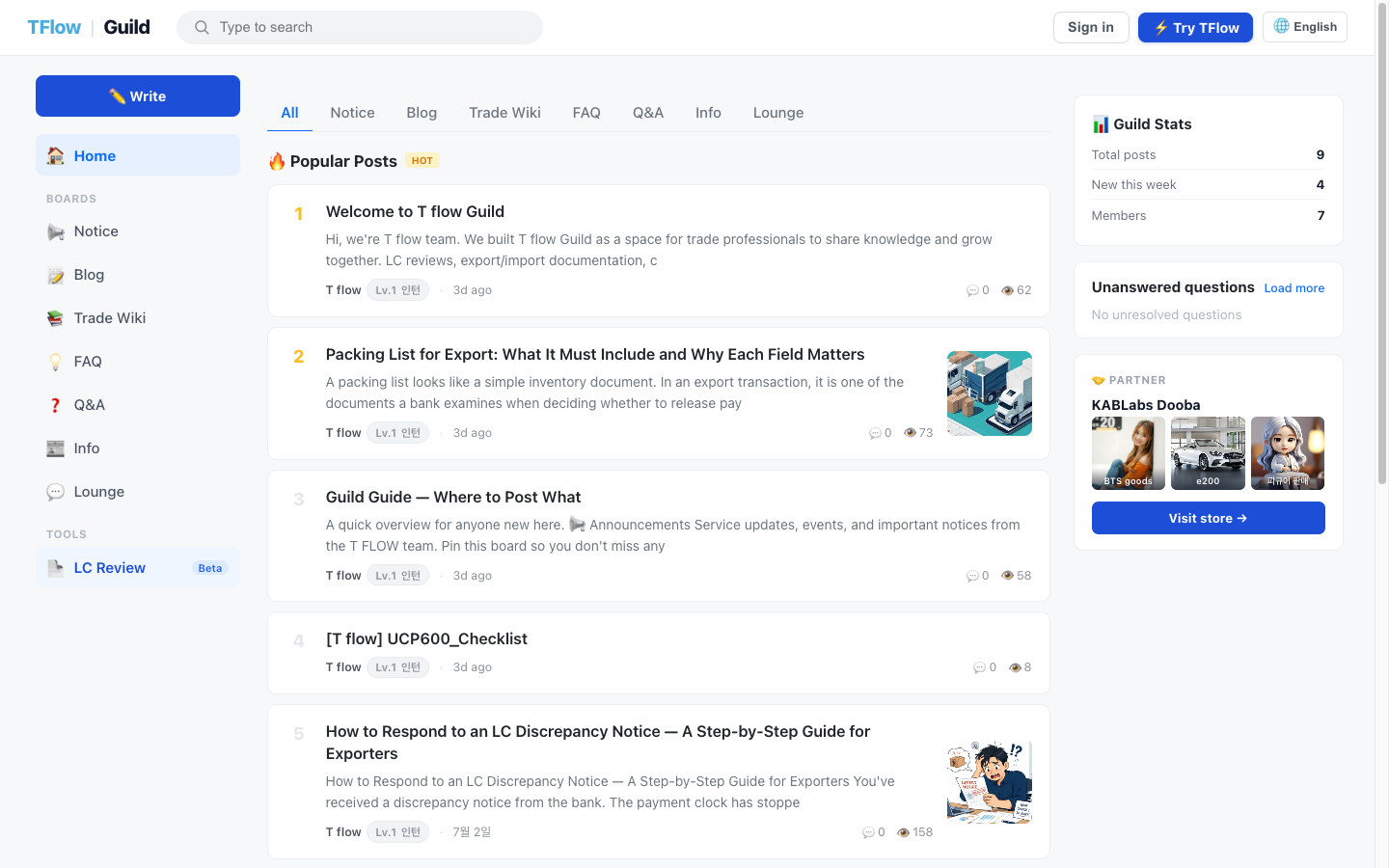
The screen uses a Reddit-style three-column layout: the board menu on the left, the post feed in the center, and the information panel on the right.
💡 Who is it for? Anyone who wants to ask other practitioners about the parts of trade work they get stuck on, anyone who wants to share regulatory or market information, and anyone who wants a quick review of a Letter of Credit (L/C). You can join right away with your TFlow account — no separate sign-up needed.
1. Getting Started — Access and Login
If you saw "You need to sign in" or "Your sign-in session is missing or expired" — click Login on the right of the header. The Guild has no sign-up of its own, so your TFlow main app account gets you straight in, and you are returned to the screen you were viewing. If it says "You don't have a guild profile yet", just go through the nickname onboarding once.
Login (SSO) — there is no separate sign-up
The Guild has no sign-up of its own. Just log in with your TFlow main app account.
- Click Login on the right of the header → you are taken to the main app login screen.
- Once you log in, the shared authentication (SSO) across all of
.tflowx.comapplies, so you can move between Store, Studio, and Guild without logging in again. - After login, you are automatically returned to the Guild screen you were viewing.
ℹ️ What you can view without logging in / What requires login
- View only: The home, board lists, and most post details can be viewed without logging in (they are also exposed to search engines).
- Login required: Writing posts, comments, and answers; upvoting/downvoting; the Trade Wiki's glossary and HS Code tools; the resource library's contents and attachments; and the Free L/C Review all require login.
🖼️ Screen capture The login button on the right of the header, the "Get started with TFlow" CTA, and the 🌐 language toggle 📍
guild.tflowx.com/· saved atimages/guild/header-login.png
Access paths
| Method | Path |
|---|---|
| Direct access | guild.tflowx.com |
| From the main app | Click Family Sites → Community (👥 icon) at the bottom of the left sidebar |
| From the store | The Guild link in the store's public header and footer |
2. First Time Here? — Nickname Onboarding
If you are logged in but don't yet have a Guild profile, you are taken to the onboarding screen (/onboarding). On the "Welcome to the Guild" screen, create a nickname to start participating in the community.
| Item | Required | Description |
|---|---|---|
| Handle | Required | Lowercase letters, numbers, and underscores (_), 3–20 characters. Displayed in @handle form; it can later be changed in My Page account settings, once every 90 days. ✨ UPDATED (2026-08) |
| Display name | Required | The name shown to others |
| Profile image | Optional | Enter an image URL (optional) |
| Bio | Optional | A brief introduction of yourself |
| Terms agreement | Required | Check "I agree to the Community Terms of Service and Privacy Policy" (PIPA consent) |
- Roughly 20 reserved words such as
admin,root,system,moderator,tflow,guild,api, andmecannot be used as a handle. - Format errors, reserved words, and duplicate handles are flagged right below the input field. (e.g., "This handle is already in use")
ℹ️ Guidance text: "Your community activity is linked internally to your TFlow account, but no information other than your nickname is made public."
🖼️ Screen capture Onboarding form — handle · display name · profile image · bio · terms agreement checkbox + Complete sign-up button 📍
guild.tflowx.com/onboarding· saved atimages/guild/onboarding.png
3. Screen Layout (Three-Column Layout)
When you enter the home after logging in, the screen is divided into three horizontal columns.
| Area | Position | Role |
|---|---|---|
| Sidebar | Left | Board navigation (Home · Questions · Free Talk · Info) and Tools (LC Review) |
| Feed | Center | Board tabs + 🔥 Popular posts + 📋 Latest posts |
| Information panel | Right | Guild status · unanswered questions · popular tags · partner spotlight |
Home screen layout
- Board tabs: Switch between All / Questions / Free Talk / Info at the top
- 🔥 Popular posts: The top 5 currently trending posts (HOT badge; ranks 1 and 2 get gold rank cards)
- 📋 Latest posts: The 8 most recent posts (board tag chip + title + 💬 comment count + 👍 upvote count)
Right information panel
| Card | Contents |
|---|---|
| 📊 Guild status | Total posts · new posts this week · number of registered members |
| Questions awaiting answers | Up to 6 unanswered Q&As + See more to go to the Questions board |
| 🏷️ Popular tags | Chips for the top 10 most-used tags |
| Partner spotlight | Cards for eligible store sellers (Visit store). If there is no seller to feature, an LC Review promo may be shown instead.footnote |
📱 Mobile screen ✨ UPDATED (2026-08) — On a narrow screen (mobile or a small window), a bottom tab bar replaces the left sidebar, with five tabs: Home · Boards (bottom sheet) · Write · Search · Profile. Tapping Boards slides up the same board list as the sidebar, and on a post detail page the bottom bar becomes an action bar with vote · jump to answers/comments · share.
🖼️ Screen capture Right information panel — guild status · questions awaiting answers · popular tags · partner spotlight cards 📍
guild.tflowx.com/· saved atimages/guild/right-panel.png
4. Tier Badges
A tier badge that rises with your activity is shown next to your nickname. There are 8 tiers, named after corporate job titles.
| Tier | Name | Tier | Name | |
|---|---|---|---|---|
| 1 | Intern | 5 | Deputy General Manager | |
| 2 | Staff | 6 | General Manager | |
| 3 | Assistant Manager | 7 | Executive | |
| 4 | Manager | 8 | CEO |
- Experience points (XP) are displayed alongside the tier badge. XP is earned through activity — writing posts, answering, having an answer accepted — and your tier rises automatically as XP accumulates. ✨ UPDATED (2026-08)
- Role badges ✨ NEW — Separately from the tier badge, Expert and Admin members show a role badge next to their nickname. You'll see it on answers, comments, post lists, post details, public profiles, and My Page. Experts are verified trade practitioners designated by the operators.
- The points system is in preparation.
5. Multilingual (7 Languages)
You can change the language from the 🌐 language toggle on the right of the header.
- Supported languages: English · 한국어 · 中文 · 日本語 · Русский · Français · Deutsch (7 total)
- English is the canonical address, and other languages have a language code in the address, such as
/zh/. - Posts are automatically translated and provided in multiple languages. Translated posts carry a 🌐 Machine translation badge, and you can toggle View original / View translation in the post detail.
ℹ️ The screen menus (UI) themselves are fully translated only into Korean and English; in other languages you get the English UI plus translated post content.
6. AI Chatbot Widget — Ask Without Logging In ✨ NEW
On any Guild screen, pressing the chat button at the bottom right opens the AI chatbot. Type a practical trade question and the answer streams in real time.
- Guests welcome: You can ask questions right away without logging in.
- Usage notes: After several uses without logging in, a sign-up prompt appears, and with heavier use there may be a few seconds of wait before the next question or an informational banner alongside. Logging in with a TFlow account gives a smoother experience.
- AI answers are for reference. For a proper review, post to the Q&A board or use the free LC review.
🖼️ Screen capture Bottom-right AI chatbot widget — chat button + open conversation (streaming answer) 📍
guild.tflowx.com/· save locationimages/guild/chat-widget.png
7. What Can You Do?
| What you want to do | Guide |
|---|---|
| Ask and get answers · post · comment · upvote · report/block · share | Using the Community |
| Browse the resource library · trade glossary · HS Code | Trade Wiki |
| Get a free review of your Letter of Credit (L/C) | Free LC Reviewfootnote |
💡 Troubleshooting (FAQ)
Q. Where do I sign up? A. The Guild has no separate sign-up. Just log in with your TFlow main app account; if it's your first time, you go through onboarding where you only need to set a nickname (handle).
Q. I set my handle wrong. Can I change it?
A. You can change it under My Page (/me) > Account settings. It is limited to once every 90 days, so choose carefully. ✨ UPDATED (2026-08) — An editing screen for other information such as display name and bio is not currently provided.
Q. I'm logged in, but I can't post or comment. A. Your session may have expired. Refresh the page and try again. If it still doesn't work, log out from the header and log back in.
Q. I can't see the left board menu. A. On a narrow screen, a bottom tab bar appears instead of the sidebar. Tap the Boards tab and the board list slides up as a sheet. ✨ UPDATED (2026-08)
Q. I don't see the "LC Review" menu or the LC banner at the top. A. The Free L/C Review, the LC banner, and the LC promo on the partner card are a beta feature that is still open only in some environments, so they may not appear. Also, for accounts that already hold a TFlow license (subscription), these entry points are not displayed; instead you are guided to proceed within the main service. For details, see the Free LC Review document.